invideo
invideo is an AI video editor whose Agent Two indexes your footage, applies edits across shots on a multitrack timeline, and adds generative image and video models for creatives.
What is invideo?
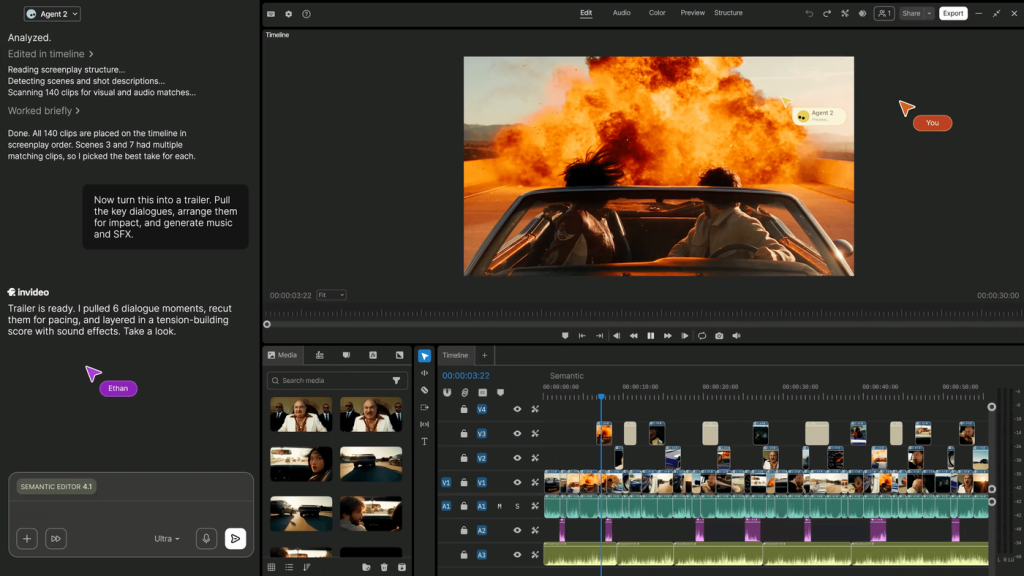
invideo is an AI video platform that has evolved into what it calls an agentic video editor. Its editing agent, Agent Two, watches and logs every clip you upload, finds moments when you describe them, and applies edits across many shots at once on a real multitrack timeline that you can take over at any frame. Generative image and video models are built in for creating new footage when you need it.
The product is positioned for serious creatives: filmmakers, advertisers, microdrama producers and social media teams who want AI to handle repetitive editing while they keep creative control. Find out more on the official invideo website.
Key Features of invideo
Agent Two editing agent
Give plain-language instructions such as cutting pauses, matching a look or building a trailer, and the agent carries them out on the timeline. Lite, Pro and Ultra agent levels are available depending on plan.
Searchable footage memory
Every uploaded clip is indexed, so you can locate a take or moment by describing it instead of scrubbing through hours of footage.
Professional timeline
The editor includes multitrack editing plus color, audio and 3D tools on every plan, with exports up to 4K from your own footage.
Storyboards, scripts and custom agents
Turn an idea into a shot-by-shot plan, write with an AI co-writer, and set up custom agents for roles such as colorist, sound designer or cinematographer.
Bring your own agent
External assistants including Claude Cowork, ChatGPT Codex, Grok and Gemini can connect to the editor and make changes you watch in real time.
Real-time collaboration
Multiplayer mode shows live cursors and comments, and higher plans add free guest seats.
invideo Pricing
invideo charges per seat, with monthly credits shared across generative models. At the time of checking, annual billing was shown at 50% off, annual plans included 30 days of unlimited Nano Banana 2.1, Ideogram 4.5 and other image models, and an additional discount was offered after sign-up. No free plan was listed on the pricing page.
Team and Business plan options are also available. Credits are used for generation, not for downloads, and unused credits do not roll over to the next month.
Prices checked on October 27, 2026; check the official pricing page for current plans.
Who Should Use invideo?
- Editors who want AI to handle logging, rough cuts and repetitive changes.
- Ad teams producing many on-brand variations from one brief.
- Microdrama and series producers who need character and story consistency.
- Social teams cutting one idea into many vertical versions.
- Collaborative teams that review and edit in the same project.
Is invideo Worth It?
invideo's shift to an agent-driven editor makes it more useful for real projects with your own footage than template-based AI video makers. The searchable clip memory, batch edits and full timeline are genuine time savers, and connecting external agents is a forward-looking extra.
On the other hand, there is no free plan on the pricing page, Starter only includes the Lite agent and no Seedance 2.5 access, and credits reset monthly. Per-seat pricing can add up for larger teams. If editing and generating video is a regular part of your work, Plus on annual billing is where the platform's full feature set starts to pay off.