Pixian.AI
Pixian.AI removes image backgrounds with its own AI model, offering free low-res use in the browser and prepaid credits for full-resolution web and API processing.
What is Pixian.AI?
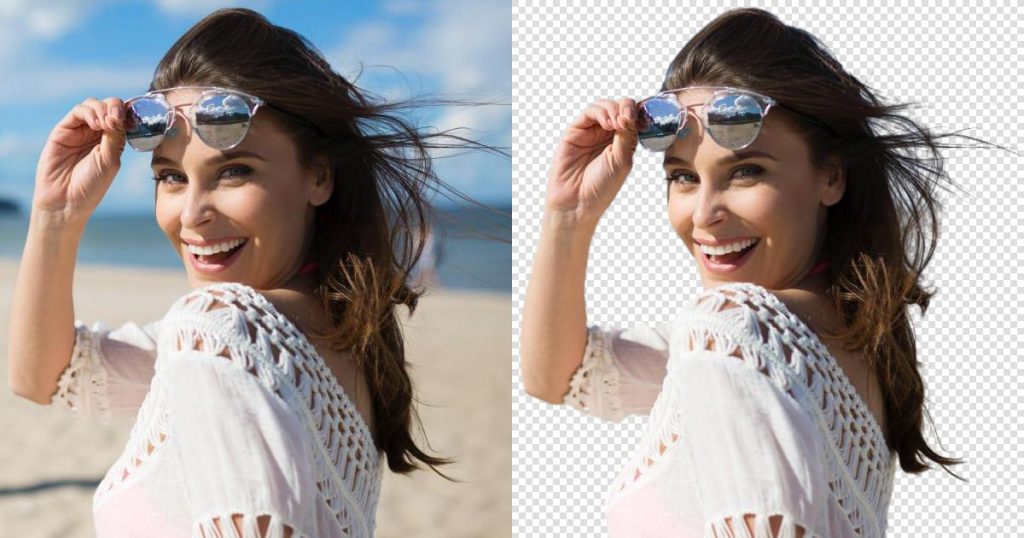
Pixian.AI is a web-based background remover that cuts the subject out of a photo and returns a transparent or solid-colour result. You drag an image onto the page, the service processes it on its own GPU servers, and you can preview the cut-out before downloading. The same engine is available through an API, which the company positions as a low-cost drop-in replacement for other background-removal services.
The tool suits online sellers preparing product shots, designers who need quick cut-outs, and developers who want to automate background removal in their own apps without a monthly subscription.
Key Features of Pixian.AI
Custom Background Removal Model
Pixian runs a proprietary AI model trained on its own dataset. It handles people, hair and fur, and the company says it performs particularly well on objects, artworks, logos and scanned images.
Flexible Output Options
Results can be transparent PNG or opaque JPEG/PNG with white, black or any custom background colour. You can also crop to the subject with a margin, resize to presets such as 1920×1080 or 1080×1920, align the subject and add a filename suffix.
Batch Processing in the Browser
You can drop several images at once, paste from the clipboard, and use "download all" to grab the finished files. An ecommerce preset applies sensible defaults for product listings.
Developer API
The API uses the same model as the website. Integration and testing are free, and moving from remove.bg is described as a matter of switching the endpoint and API key.
Wide Input Support
JPEG, PNG, BMP, GIF and WebP files are accepted, including images created with generators such as Stable Diffusion. Paid processing supports images up to 25 megapixels and files up to 30 MB.
Short Data Retention
According to the FAQ, website uploads are kept briefly to allow re-downloads and then deleted, while API images are not written to permanent storage. The company states it claims no rights over your results.
Pixian.AI Pricing
There are no subscriptions. The website offers limited free use at low resolution, and anything beyond that runs on prepaid credit packs that work on both the website and the API. Each image costs between 0.05 and 1 credit depending on its megapixel size, so a full 25 MPx image costs one credit and small images cost a fraction of that. Prices are shown in USD (EUR is also available).
Prices checked on October 28, 2026; check the official pricing page for current plans.
Credits do not expire as long as you have made a purchase within the last two years. Payment is by card or PayPal, credit packs are non-refundable, and there is no academic or non-profit discount. Other pack sizes between those listed above are also available.
Who Should Use Pixian.AI?
- Ecommerce sellers who need clean white or transparent product photos.
- Designers and marketers making cut-outs for banners, thumbnails and social posts.
- Developers adding background removal to an app or pipeline at a low per-image cost.
- Teams currently paying for remove.bg who want a cheaper API with a similar interface.
- Occasional users who only need a quick, low-resolution cut-out for free.
Is Pixian.AI Worth It?
Pixian.AI does one job and keeps it inexpensive. The pay-as-you-go model, sub-cent prices for typical images and a free API integration make it attractive for anyone processing images in volume, and the output controls cover most ecommerce needs without extra editing software.
The limits are clear, though. Free results are capped at a quarter of a megapixel, which is too small for most professional uses, so you will need credits for anything serious. The company's own quality comparison shows it trails the leading competitor on photos of people, there are no refunds on credit packs, and it does not offer editing beyond background removal. If you mainly cut out products, logos or artwork and want to avoid subscriptions, it is well worth a try; for heavy portrait work, compare results on your own images first using the free comparison tool.